back to Work examples

Inciary work example.

Native iOS work example: App Store direction, mobile product screen, localization requirements and fast iteration around a real user-facing app.

native iOS App Store direction mobile-first product judgment
buyer answer

Native iOS example is useful only when release question matters.

Read Inciary when the buyer needs a phone-first product, App Store direction, support thinking, localization requirements and handover discipline before trusting a larger iOS build.

  1. Buyer decision Choose EV1 when the first useful version must work as a native mobile product, not a web mockup.
  2. What this shows Mobile product judgment, release question and iteration can stay in one operating loop.
  3. Question to ask Ask what device, release, support, privacy or localization gate would make the next spend safer.
  4. Stop condition If only a static landing page or disposable visual demo is needed, choose a cheaper option first.
case snapshot

Product question

Inciary had to behave like a real iOS product, not a concept page: user-facing flow, App Store direction, product copy and iteration all mattered at once.

case snapshot

Main challenge

Native apps carry release, device, privacy, localization and support concern. Those concerns have to be part of the build from the beginning.

case snapshot

Reusable client value

The same judgment applies to a client MVP: define the useful first mobile page, avoid disconnected demos and keep release signal visible.

case snapshot

Source rule

Public evidence should stay current. The live listing is used as the source anchor until deeper case material is selected.

case signal

Problem

Turn a raw product idea into a native iOS page that can be judged on device, not only described in planning notes.

case signal

Challenge

Mobile UX, App Store direction, localization, support and iteration all had to move together without turning the first version into a heavy platform.

case signal

Built

Native product flows, release-oriented structure, public listing direction and the operating notes needed to keep the product moving.

case signal

Uncertainty reduced

The product stopped being only an idea. It became a visible mobile path with clearer release, user and iteration decisions.

case signal

Reusable value

A client gets the same pattern: define the smallest useful native page, keep release signal visible and avoid a disconnected demo.

current screen

Use the screen to explain release readiness, not decoration.

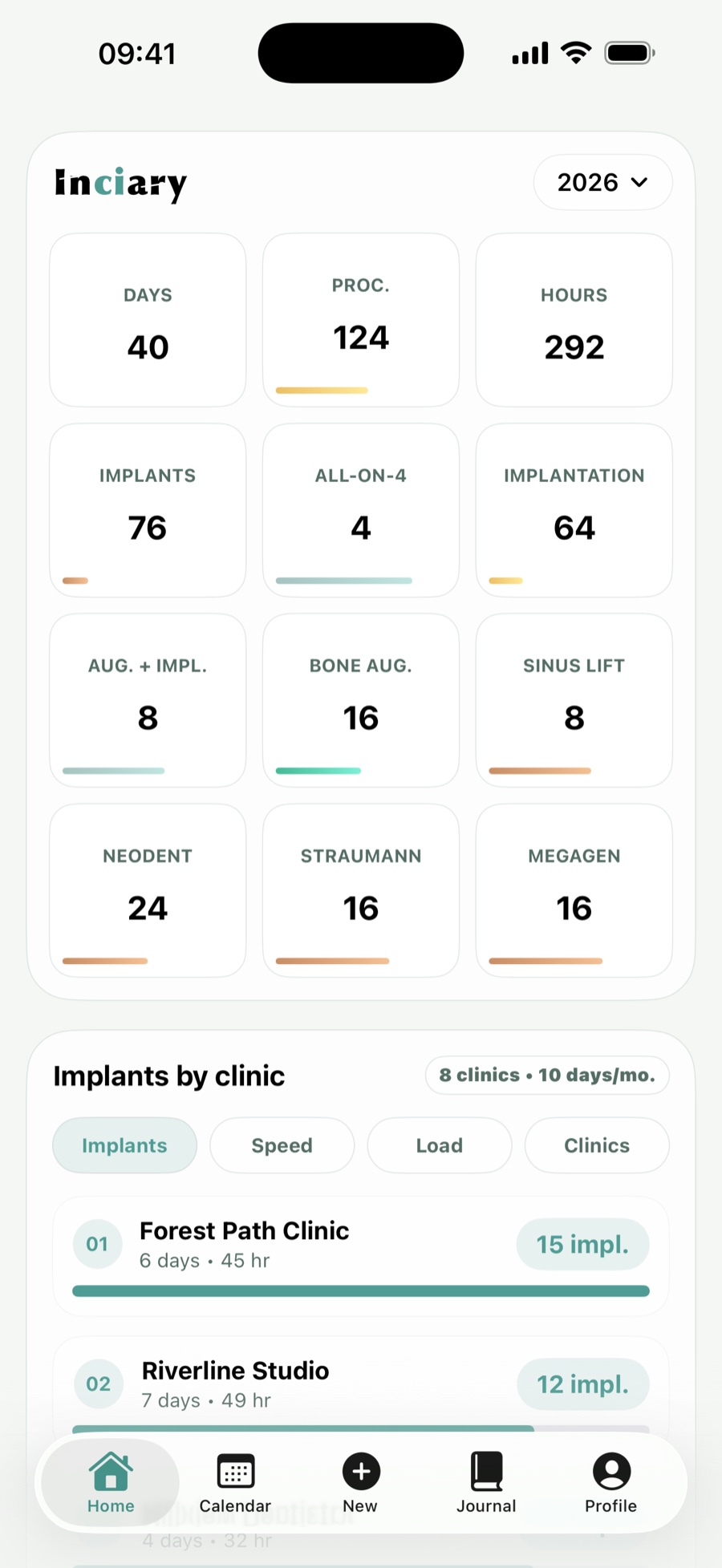
The current capture shows an English demo dashboard with year metrics, procedure totals and clinic comparison. It is safe to show because it demonstrates product screen and analytics without exposing patient records.

Inciary English demo dashboard with yearly metrics, procedure totals and clinic comparison.
Inciary Dashboard screen

Current public-safe product capture used to show mobile analytics and release-facing product judgment.

case snapshot

Platform and stack signal

Native iOS product screen with App Store direction, mobile UX, support, localization and release-path concern.

case snapshot

Deliverables signal

Phone-first workflow, dashboard page, product copy, public listing direction, support thinking and handover notes.

case snapshot

Timing and scope signal

Do not infer a fixed sprint from this example. A client version is scoped by first user, release gate and evidence needed.

case snapshot

What remains to verify

A buyer should still ask which device, App Store, data, support or localization evidence applies to their own product.

buyer signal

Client relevance

If your product depends on native iOS quality, the concern is not only UI. It is the release plan, device behavior, copy, privacy and the first real user loop.

buyer signal

What a buyer can use

Look for release-oriented decisions: App Store direction, support page, localization requirements and a product flow that can be tested on a real device.

buyer signal

Transferable capability

The reusable skill is turning an idea into a native product screen with enough structure to keep improving after the first release.

buyer signal

Best-fit service

This example supports iOS-first MVP builds and product repair when the main concern is mobile release quality, not another web mockup.

service fit

Use this example when native release question is the buying question.

Inciary should help a buyer decide whether the first safe move is an iOS MVP build, a product audit or a repair pass on an existing app.

  1. Offer match iOS-first MVP when the first user and core phone workflow are clear enough to build.
  2. First paid step Product audit when native scope, data flow, release gate or App Store boundary is still unclear.
  3. Repair track Product repair when an existing app has mobile UX, support, localization or release blockers.
  4. Stop rule Do not buy EV1 time when the need is only a static landing page or disposable web mockup.
forwardable work note

Forward this when the buyer asks whether EV1 can own native release question.

The useful signal is not a screen gallery. It is evidence that EV1 can move a phone-first product from idea toward release, support, localization and handover without losing the first user.

  1. What this shows Native iOS product judgment, release question and mobile-first iteration can stay in one operating loop.
  2. When it transfers Your MVP needs phone-first UX, App Store direction, support copy, localization or device evidence.
  3. What to ask EV1 Which native question is closest, what evidence would make the next spend safer and where audit should start.
  4. When the example is not enough If you only need a landing page or throwaway mockup, use a cheaper option before buying EV1 build time.
hire trigger

Hire EV1 Labs when native iOS is the product.

Best fit when the first useful version must work on phone, carry product copy, handle support needs and move toward App Store direction.

protect this

Protect the release plan early.

Do not wait until the interface looks finished to ask about privacy, device behavior, localization, support, App Store metadata and handover.

first paid step

Start with audit if the release boundary is unclear.

If the first user, native scope, data flow and launch plan are not locked, buy the product audit before an MVP build.

work brief

Send a native iOS work brief.

If your project has phone-first UX, release, localization, support or App Store question, use this example to explain the concern.

Send iOS work brief
live page

Open the public app listing.

Use the live listing as release signal while deeper case-study material stays current.

Open listing